Settlement Overview
Studios pay settlement fees to PlayCamp for revenue generated through creator boost codes and settle platform fees.
Fee Structure
PlayCamp fees vary based on the game build distribution method.
Total revenue is the payment amount from boosters who boost creators. Fees and creator share rates are applied after deducting store fees.
| Type | Platform | Distribution Method | PlayCamp Fee | Creator Share |
|---|---|---|---|---|
| Type A | PC | External Store (Steam, etc.) | 8.0% | Per campaign setting |
| Type B | PC | Self-hosted | 8.0% | Per campaign setting |
| Type C | Mobile | External Store (Google/Apple) | 8.0% | Per campaign setting |
| Type D | Mobile | Self-hosted | 8.0% | Per campaign setting |
Settlement Process Timeline
Example based on January revenue
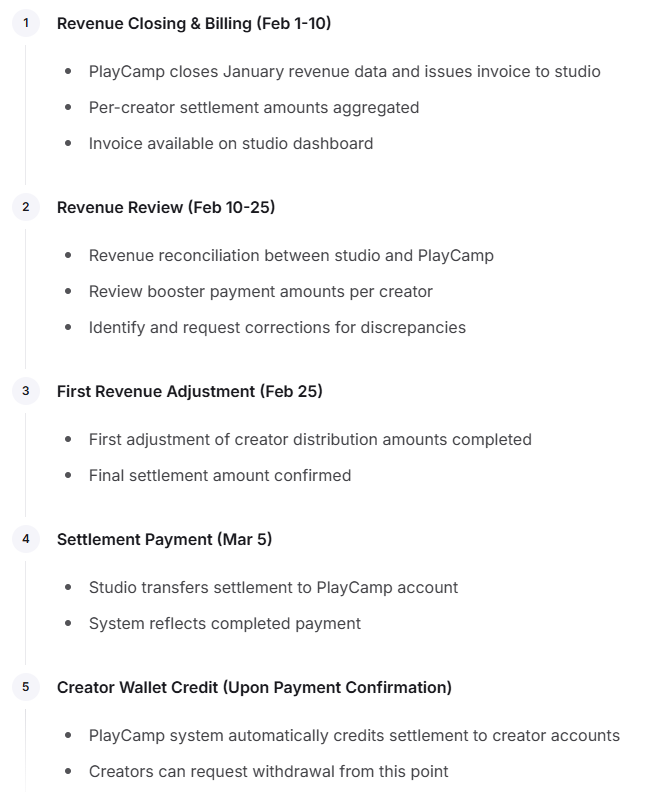
Revenue Reconciliation
Review Period
M+1 month, days 1-15 (after previous month’s revenue closing)
Provided Information
PlayCamp provides the following information through the studio dashboard:
- Campaign ID
- Platform (PC/Mobile)
- Boosted Creator ID
- Payment Time
- Payment Amount
- Payment Currency
- USD/KRW converted amount
- Per-creator settlement amount
- Refund amounts
Review Procedure

Payment Methods
Domestic Settlement (KRW)
| Item | Details |
|---|---|
| Account | PlayCamp provided account information |
| Deadline | M+2 month, day 5 |
| Method | Bank transfer |
International Settlement (USD)
| Item | Details |
|---|---|
| Account | PlayCamp foreign currency account |
| Deadline | M+2 month, day 5 |
| Method | International wire transfer |
Decimal Handling Policy
| Currency | Handling | Example |
|---|---|---|
| USD | Truncate below 2 decimal places | 100.1234→100.12 |
| KRW | Truncate below 1 won | ₩1,234.56 → ₩1,234 |
Refund Processing
Refund Deduction Logic
- When calculating current month’s settlement, fees for refunds from the previous month are deducted.
-
Formula:
Current Month Confirmed = Current Month Credit - Previous Month Refund Fees - Exception: If deduction exceeds credit, current month is set to $0 and remaining deduction carries over to next month
Dashboard Features
The following features are available on the studio dashboard:
| Feature | Description |
|---|---|
| Invoice View | View monthly billing details |
| Revenue Reconciliation | View detailed revenue by creator |
| Payment Status | Check settlement payment completion |
| Creator Performance | View creator results by campaign |
Complete Settlement Flow
Inquiries & Support
For settlement-related inquiries, please contact the PlayCamp settlement team.