Boost and coupon features via PlayCamp WebView
Provide boost and coupon features using PlayCamp’s web-based UI.
Overview
WebView is a boost/coupon management web UI provided by PlayCamp. It works in both in-game embedded browsers (WebView) and external browsers. You can provide Creator Boost and coupon features without building custom UI.
Server API Direct Integration vs WebView
| Item | Server API Direct Integration | WebView |
|---|---|---|
| UI Development | Game studio must implement | Provided by PlayCamp (no additional development) |
| Integration Difficulty | Individual integration per API | Only 1 API for OTT issuance |
| Customization | Full freedom | Theme color/font customization |
| Multilingual | Game studio handles | Auto-supported (Korean/English) |
| Best For | When game UX must be perfectly matched | When you want to provide features quickly |
Architecture
Integration Flow
OTT Issuance API
Request
- cURL
curl -X POST "https://sandbox-sdk-api.playcamp.io/v1/server/webview/ott" \
  -H "Authorization: Bearer ak_server_xxx:secret" \
  -H "Content-Type: application/json" \
  -d '{
    "userId": "user_12345"
}'- Node SDK
const result = await server.webview.createOtt({
  userId: 'user_12345',
  campaignId: 'campaign_123',       // optional
  codeChallenge: 'challenge_value', // optional
  callbackId: 'cb_001',             // optional
  metadata: { key: 'value' },       // optional
});

console.log(result.ott);       // one-time token
console.log(result.expiresAt); // expiry time (ISO 8601)- Go SDK
result, err := server.Webview.CreateOTT(ctx, playcamp.WebviewOttParams{
    UserID:        "user_12345",
    CampaignID:    "campaign_123",       // optional
    CodeChallenge: "challenge_value",    // optional
    CallbackID:    "cb_001",             // optional
    Metadata:      map[string]any{"key": "value"}, // optional
})

fmt.Println(result.OTT)       // one-time token
fmt.Println(result.ExpiresAt) // expiry time
Parameters
| Field | Type | Required | Description |
|---|---|---|---|
userId |
string | Yes | In-game user identifier |
campaignId |
string | - | Scope WebView to a specific campaign |
codeChallenge |
string | - | PKCE S256 challenge (Base64URL-encoded SHA256, 43-128 chars) |
callbackId |
string | - | Webhook tracking ID |
metadata |
object | - | Additional metadata (stored in session) |
Response (201 Created)
{
  "data": {
    "ott": "a1b2c3d4e5f6...64char_hex",
    "expiresIn": 60
  }
}| Field | Description |
|---|---|
ott |
One-Time Token (64-character hex string) |
expiresIn |
Time until expiry (seconds, default 60) |
WebView URL Configuration
Base URL
| Environment | URL |
|---|---|
| Sandbox | https://sandbox-sdk-api.playcamp.io/webview/?ott={token} |
| Live | https://sdk-api.playcamp.io/webview/?ott={token} |
Option Parameters
| Parameter | Description | Example |
|---|---|---|
lang |
Language setting (ko, en) | ?ott=xxx&lang=en |
tabs |
Limit displayed tabs (comma-separated) | ?ott=xxx&tabs=sponsor,coupon |
tabs options
| Value | Description |
|---|---|
sponsor |
Boost management tab |
coupon |
Coupon redemption tab |
campaigns |
Campaign list tab |
creators |
Creator search tab |
Theme Customization
Customize WebView colors and fonts via URL parameters.
| Parameter | Description | Default | Example |
|---|---|---|---|
primaryColor |
Button/accent color (hex) | Game theme color | primaryColor=FF6B35 |
bgColor |
Background color (hex) | Dark theme | bgColor=1a1a2e |
textColor |
Text color (hex) | Light text | textColor=ffffff |
fontFamily |
Font family | System default | fontFamily=Noto Sans KR |
#. Example: primaryColor=FF6B35
Full example
/webview/?ott=xxx&lang=ko&tabs=sponsor,coupon&primaryColor=FF6B35&bgColor=1a1a2e&textColor=ffffff
Key Features
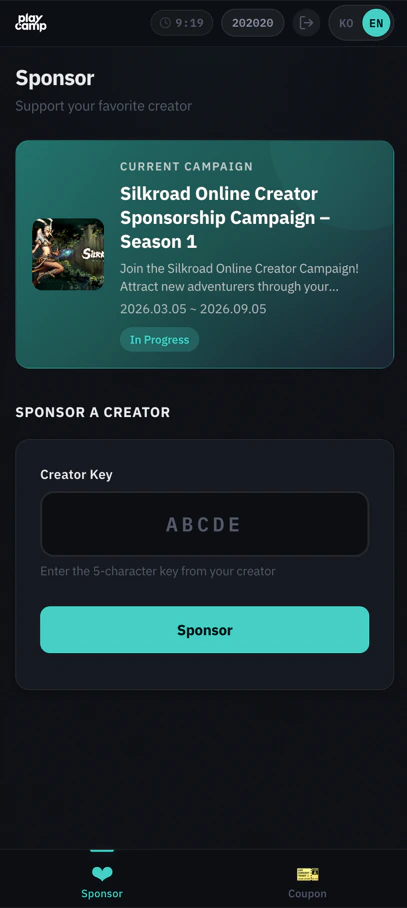
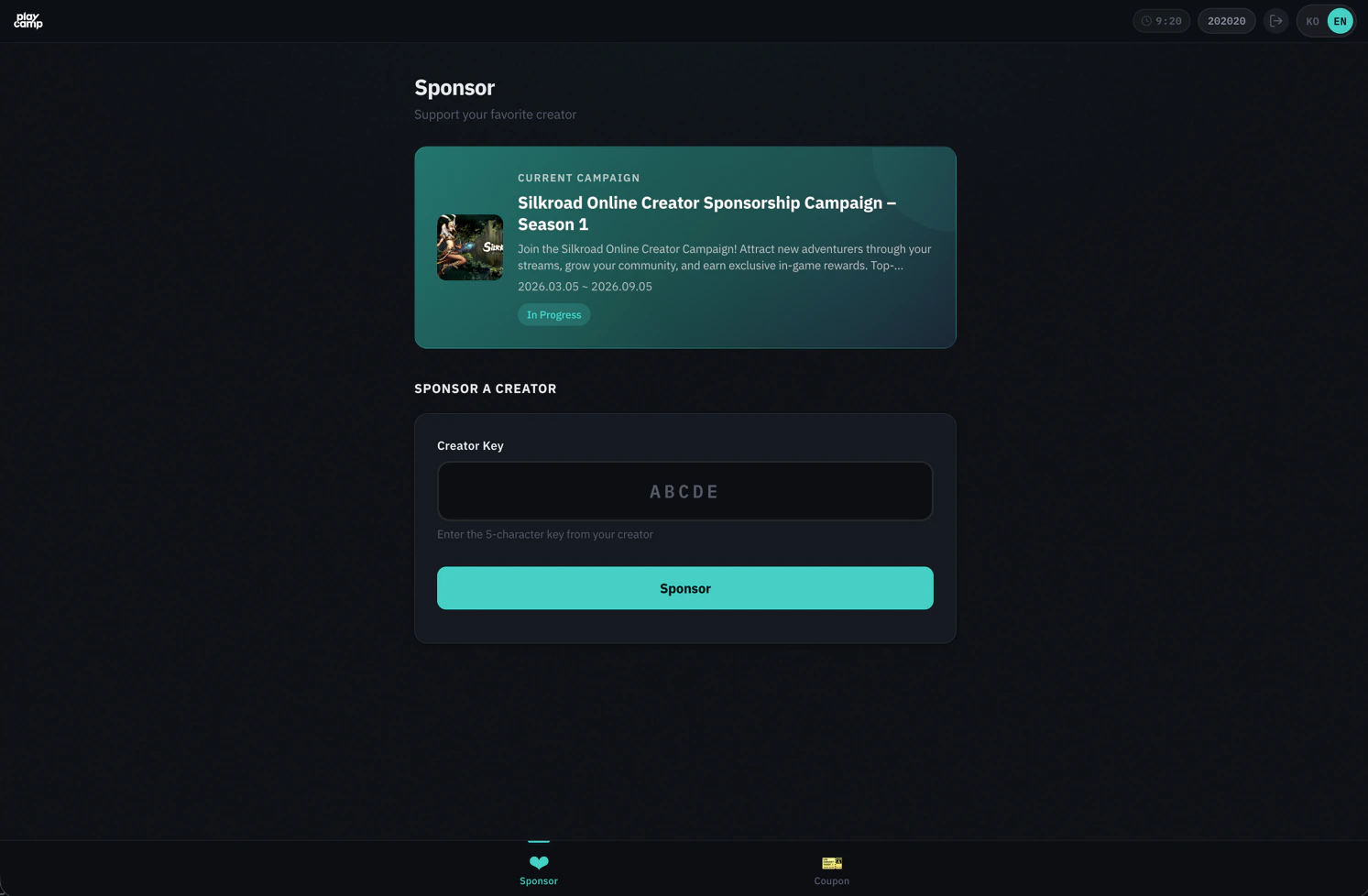
Boost Management
Users can search for creators and register/change/remove boosts in the WebView.
- Creator Search: Search by creator key or name (real-time autocomplete)
- Register Boost: Register boost for selected creator
- Change Boost: Change to a different creator (30-day cooldown applies)
- Remove Boost: Remove current boost
Creator Key Prefill
Include a creator key in the URL to prefill the search form:
/webview/?ott=xxx#sponsor?creatorKey=ABC12
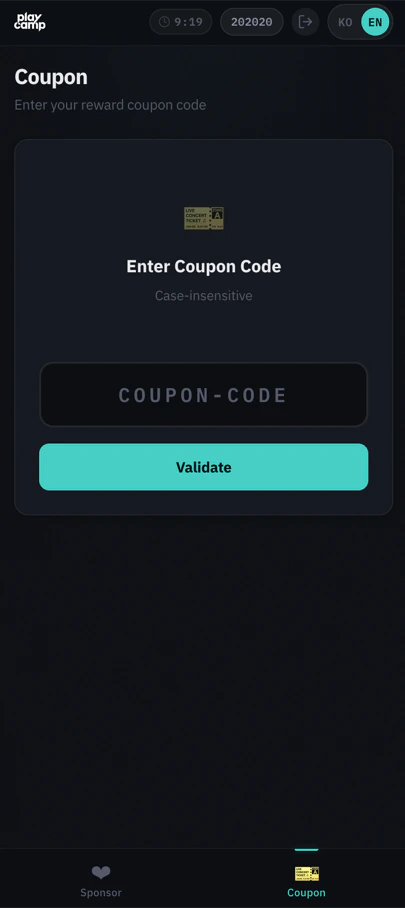
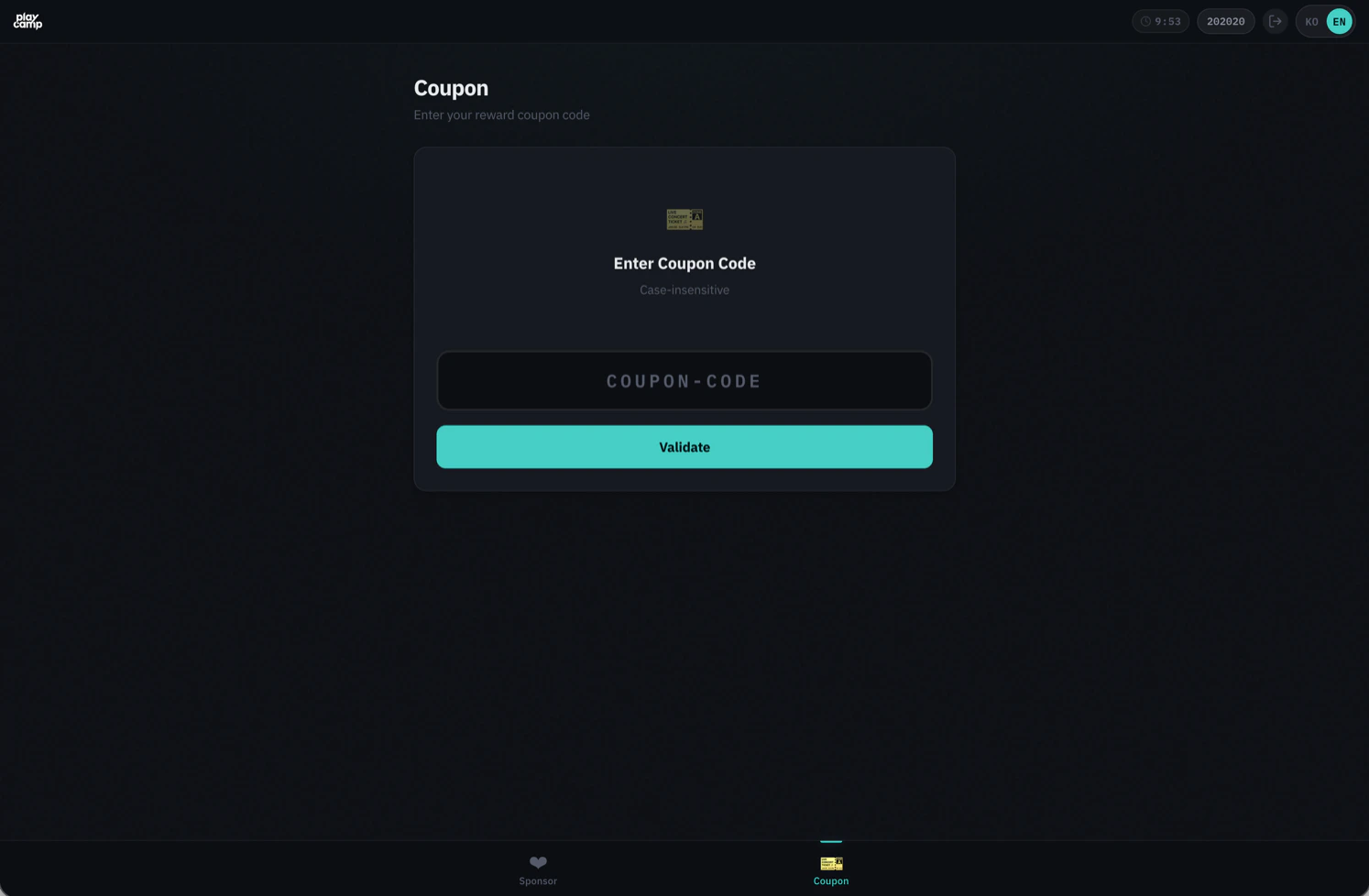
Coupon Redemption
Coupons are redeemed in 2 steps: Validate → Redeem
- Code Input: 5-50 characters, auto uppercase conversion
- Validation: Check validity and preview reward items
- Redemption: Confirm to finalize (returns usage ID)
Webhook Event Integration
Actions performed by users in the WebView are delivered to the game server via webhooks.
Events from WebView
| Event | Description | Key data fields |
|---|---|---|
sponsor.created |
Boost registered |
userId, campaignId, creatorKey
|
sponsor.ended |
Boost removed |
userId, campaignId, creatorKey
|
coupon.redeemed |
Coupon redeemed |
couponCode, userId, usageId, reward
|
Webhook Payload Examples
sponsor.created
{
  "events": [
    {
      "event": "sponsor.created",
      "timestamp": "2024-01-15T10:30:00.000Z",
      "callbackId": "cb_001",
      "data": {
        "userId": "user_12345",
        "campaignId": "campaign_001",
        "creatorKey": "ABC12"
      }
    }
  ]
}
coupon.redeemed
{
  "events": [
    {
      "event": "coupon.redeemed",
      "timestamp": "2024-01-15T10:31:00.000Z",
      "callbackId": "cb_001",
      "data": {
        "couponCode": "CREATOR-ABC12-001",
        "userId": "user_12345",
        "usageId": 5678,
        "reward": [{ "itemId": "gem", "itemQuantity": 100 }]
      }
    }
  ]
}
Security
OTT (One-Time Token)
- Single-use: OTT is deleted immediately upon session exchange. Cannot be reused
- 60-second TTL: Must be used within 60 seconds of issuance
- Server-issued only: Requires Server API Key, so can only be issued from the game server
Session Management
-
Session Cookie:
httpOnly,SameSite=strictsettings prevent XSS/CSRF attacks - Session TTL: 10 minutes (auto-extended based on last API call)
- Single Session: Only one session per user. Creating a new session automatically invalidates the existing one
CSRF Protection
CSRF tokens are automatically included in state-changing requests (POST/PUT/DELETE) within the WebView. No additional handling required from the game studio.
PKCE (Optional)
For additional security in app environments, you can use PKCE (Proof Key for Code Exchange).
import crypto from 'crypto';

// 1. Generate codes (game server)
const codeVerifier = crypto.randomBytes(32).toString('base64url');
const codeChallenge = crypto
  .createHash('sha256')
  .update(codeVerifier)
  .digest('base64url');

// 2. Include codeChallenge when issuing OTT
const { ott } = await server.webview.createOtt({
  userId: 'user_12345',
  codeChallenge,
});

// 3. Include codeVerifier in WebView URL
const url = `https://sandbox-sdk-api.playcamp.io/webview/?ott=${ott}&code_verifier=${codeVerifier}`;FAQ
What happens when the session expires?
A reconnection prompt is displayed in the WebView. To continue, the user needs a new OTT issued from the game server to reopen the WebView.
What is campaignId scoping?
When you specify a campaignId during OTT issuance, the entire WebView is scoped to that campaign:
- Only creators from that campaign are shown for boosting
- Campaign info is shown instead of campaign list
- Only creators participating in that campaign are searchable
How is multilingual support handled?
- Default: Auto-detected from browser language settings (Korean/English)
- URL parameter:
?lang=koor?lang=en - Language settings changed by the user are stored in the browser and persist on next visit
Can I pre-issue OTTs?
Not recommended. OTTs have a 60-second TTL, so issue them when the user requests to open the WebView.
Can payments be made in the WebView?
No. The WebView only provides boost and coupon features. Payment registration must be done by calling the Server API directly from the game server.
What happens with simultaneous access from multiple devices?
Only one session per user is allowed. Opening the WebView on a new device automatically invalidates the previous device’s session, and a session expiry notice is displayed on the previous device.